Connect Podskrift to Claude
Add Podskrift as a custom connector, sign in once, then ask Claude to summarise or quote any podcast episode.
Keep this guide open beside your app. Use this exact server URL:
https://podskrift.com/mcpCreate a Podskrift account if you don't have one. Already registered? Sign in to Podskrift before connecting.
Works on Claude Free (one custom connector), Pro, Max, Team and Enterprise, and in Claude Desktop on the same account. On Team/Enterprise an Owner adds the connector under Organization settings → Connectors first.
Set it up
-
Open Customize → Connectors
Open Claude Connectors on the web, or open Customize → Connectors in Desktop.
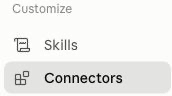
Customize → Connectors. -
Add a custom connector
Click + Add, then Add custom connector.
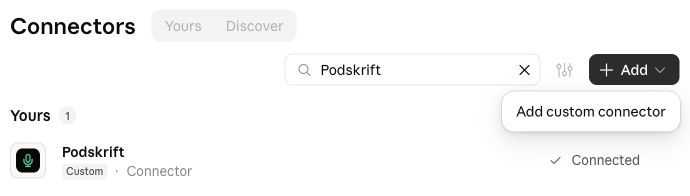
Choose Add custom connector. -
Name it Podskrift and paste the URL
Name: Podskrift. URL:
https://podskrift.com/mcp. Click Continue. Review the detected authentication settings and keep OAuth sign-in enabled. Continue to finish adding the connector. If you see an OAuth client choice, keep the recommended option; you do not need to enter a client ID, secret or API key.https://podskrift.com/mcp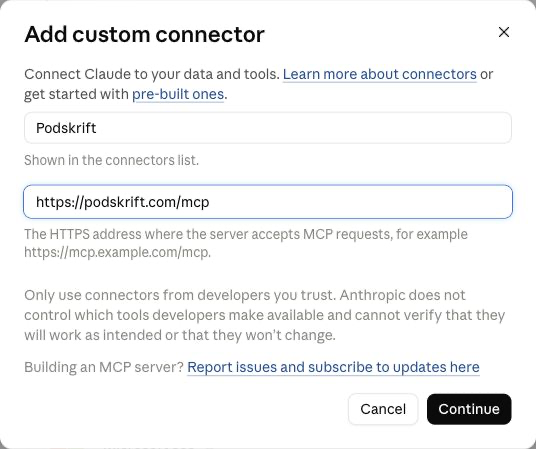
Name and remote MCP URL. -
Connect, sign in, and Allow
Click Connect. Claude opens Podskrift’s sign-in. Log in (or create an account), then click Allow.
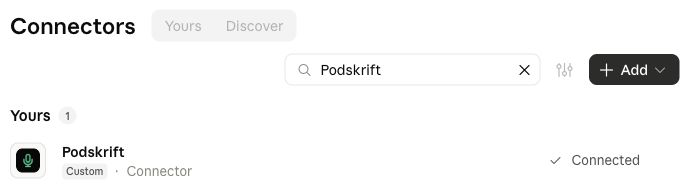
After sign-in and Allow, Podskrift shows Connected. -
Enable it in a chat
In a new chat, open the tools menu and turn on Podskrift, then ask for an episode — for example:
Summarise the latest episode of Hard Fork
Enable Podskrift from the tools menu in a chat.


Check that it worked
Podskrift should appear as connected in your app. In a new chat, enable Podskrift from the tools menu. Ask “Use Podskrift to find the latest episode of Hard Fork.” Look for a Podskrift tool call, then ask for a summary or a quote with timestamps.
If the reply says it cannot access podcasts, check that Podskrift is enabled in this conversation. A long episode may need time to transcribe; ask your AI to check the transcription status before summarising.
What you can ask
Copy a prompt and paste it into Claude after Podskrift is connected.
Summarise the latest episode of Hard ForkGet the last three episodes of Lenny's Podcast and list every book they mentionFind the exact sentence where the guest talks about pricingTranscribe this episode and translate the summary into Norwegian
What it costs
Uses your Podskrift minutes (trial, credit pack, or your own OpenAI key). Episodes you've already transcribed are free to fetch again on your account. Full pricing.
Troubleshooting
- Connector already exists — Search for Podskrift under Customize → Connectors. Use the existing connector instead of adding the same URL again.
- Sign-in loop — Finish Allow in the Podskrift window; if it keeps bouncing, open Settings → Connected apps on the website, then click Connect again in Claude.
- Not available on your plan — Free accounts get one custom connector. On Team/Enterprise an Owner must add Podskrift under Organization settings → Connectors before members can connect.
- Revoke access — On Podskrift, go to Settings → Connected apps and revoke Claude. You can reconnect later.
FAQ
Which Claude plans work?
Free (one custom connector), Pro, Max, Team and Enterprise, plus Claude Desktop on the same account. On Team/Enterprise an Owner adds the connector under Organization settings → Connectors first. Source: Anthropic's custom connectors help article.
Do I need an API key?
No. You sign in to Podskrift with OAuth when you Connect. Claude never sees your OpenAI key.
What does it cost?
Uses your Podskrift minutes. Episodes you've already transcribed are free to fetch again. Claude's own reply is part of your Claude plan.
How do I disconnect?
On Podskrift go to Settings → Connected apps and revoke access. You can also remove the connector under Claude Customize → Connectors.